Prepare for a store visit
See the location’s recent visits, open commitments, notes, and performance context before you walk in.
For store managers, general managers and district leaders
Know what happened. Remember what comes next.
Store walks, team conversations, interviews and the follow-up you promised. Keep the details together in a notebook built for managing one store or several. Use it on your phone, return to it on the web, or ask a connected AI.
Start free on iPhone. Recording analysis and AI connections require Pro. Web-only signup is coming soon.
Your day, kept together
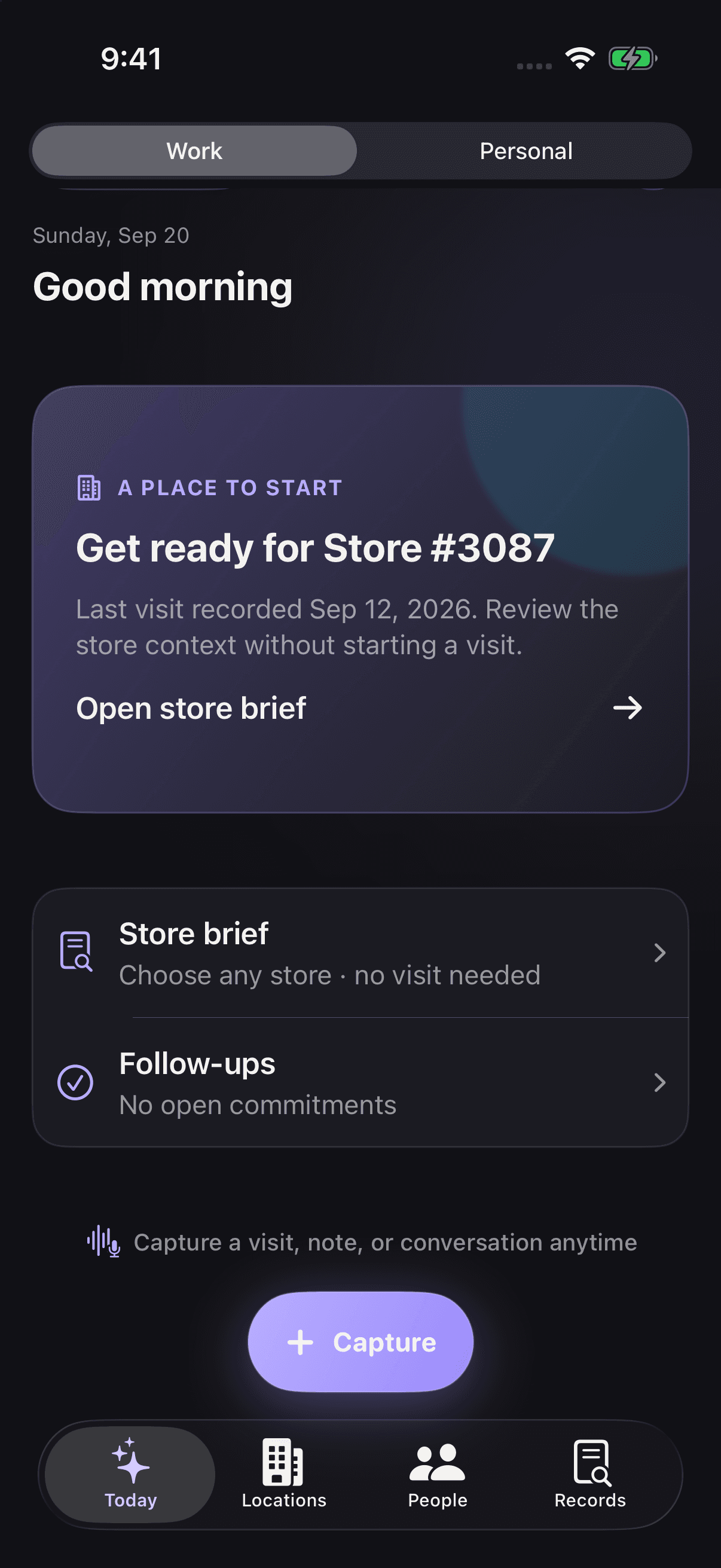
iPhone notebook · Screenshot from 4.2 (68)
Fictional sample data
A notebook built around the work
A note belongs with the store you walked. A coaching conversation belongs with the person. A promise needs a next step. OperatorOS keeps those connections so you can pick up where you left off.
See the location’s recent visits, open commitments, notes, and performance context before you walk in.
Tie commitments to a store and due date, then see what is open, overdue, or completed.
Save notes about leaders and associates, then bring the right context into your next one-on-one. People records are private to your notebook; your team does not need accounts.
Interviews · One-on-ones · Meetings
Listen without trying to write everything down. OperatorOS turns a recording into a transcript and structured analysis you can review when you have time to think.
Return to what a candidate actually said.
Record the interview, then review the transcript, question-by-question analysis, strengths and areas to explore. Keep your own assessment alongside the generated analysis.
Transcript · Question analysis · Your assessment
Give the next conversation a starting point.
Keep the discussion, positive highlights, development opportunities and follow-up together. Come back to the person’s history before you meet again.
Discussion points · Development notes · Follow-up
Keep what was discussed and what needs doing.
Review a meeting summary and its action items. Turn useful items into commitments or tasks, so the recording leads to something you can follow through on.
Summary · Action items · Commitments
Recording analysis requires Pro. Record with participants’ consent. Generated analysis is yours to review; hiring and management decisions remain yours.
Apple Watch capture
Start a recording on Apple Watch for a meeting, one-on-one, interview or store visit. Transfer it to iPhone, review the generated draft and save it to the right record.
Requires the companion iPhone app. Assisted processing requires Pro.
TRY THE WORKFLOW
Explore a fictional example without an account. No customer data, recording, or AI request is used.
Try it with your own location →Fictional · Harbor location
At our fictional Harbor location, the afternoon delivery overlaps with the busiest pickup hour. I agreed to check a different delivery window.
A short note is enough to start. Your own records remain available on Free.
At the store. At your desk. In your AI.
01 / iPhone & iPad
Save a store observation, record a conversation or check a commitment while the details are fresh.
02 / Web companion
Return to your saved records at your desk. Existing customers can sign in with their OperatorOS account; web-only signup is coming soon.
03 / Connected AI
Give a supported assistant access to your saved records. Prepare for a visit or find a follow-up in the AI you prefer. Pro required.
Your retail notebook, connected
Before a store walk, ask your connected assistant what you agreed last time. Before a one-on-one, bring back the notes you saved about that person. Your saved history gives the next conversation a starting point.
Your preferred AI may change. The records you save stay in OperatorOS. Connect a supported assistant—or several—to the same account and choose what each can read or update. You can keep building on your notebook without starting over with each new AI.
Explore supported AI connectionsPro required. Availability and setup vary by provider. Personal access requires a separate permission.
One store note. More than one way back to it.
Add an observation and the follow-up you agreed in OperatorOS.
Ask a connected assistant to retrieve the last visit and open commitments for that store.
Authorize it for the same OperatorOS account. Ask it to retrieve the saved records, then continue from there.
Connections use the records you save and allow them to access. Your private AI chats are not automatically copied or shared.
Work and Personal
The people you care about. A plan you want to come back to. The small details that are easy to forget. Keep personal notes, people and follow-ups in their own space, separate from Work.
Keep Work and Personal separate, and choose which space each supported AI can access.
Things worth keeping · Illustrative examples
A friend’s new job. A family member’s favorite places.
Ideas for a trip. Details from a conversation you want to remember.
Something you offered to do. Someone you meant to check in with.
How it works
You do not need an implementation project. Add a location, complete a visit, and let your history become more useful over time.
Enter one store or import several from a CSV.
See the follow-ups that need attention and prepare your next conversation.
Save observations, meetings, interviews and commitments in the same notebook.
Use the same location, person, and follow-up history on the next visit—or with an AI you authorize.
Pricing
Setup never starts a trial. Eligible new subscribers can begin a one-month trial from Apple's purchase sheet.
See complete pricing detailsFree
$0
Pro
$9.99/month
or $79.99/year
I manage stores and was keeping visit context, coaching notes, reminders, and commitments in several different places. OperatorOS began as a way to give that work a consistent structure. It remains a small independent product for people leading people and locations, whether their day stays in one store or takes them across several.
Read the short storySave a store note, remember a team conversation and follow through on one promise. Your notebook grows with the work.